It comes up on almost every discovery call: "I've got this room I'm not really using — can we put a sim in there?" Sometimes yes. Sometimes technically yes but practically not worth it. Sometimes no. The answer always comes down to three numbers: ceiling height, width, and depth.
This guide breaks those down the way we think about them — not just minimums, but what each threshold actually gets you. Use it as a quick reference before your first call with us, or share it with your architect or contractor if you're still in the planning stage.
A note before you measure: Everyone's different — swing style, height, and comfort level all vary. These are our guidelines based on 200+ builds, but the real test is this: take a full driver swing in your space before committing. If you can do that without thinking about it, you're in good shape. If you can't, that's the answer.
Also account for the hitting mat: turf, underlayment, and the mat itself add roughly 1–1.5 inches off your floor. Measure your ceiling from finished floor to ceiling, then subtract that.
Ceiling Height
- Overhead launch monitors are out — all manufacturer specs require a 9 ft minimum
- You're limited to floor-mounted radar units
- Driver and fairway woods are likely off the table
- Depends heavily on player height — a 5'6" player may be fine where a 6'2" player can't swing at all
- All overhead launch monitors are mountable
- Players up to about 6'0" can take a full swing with most clubs
- Driver may feel tight for taller players at the lower end of this range
- Most residential builds fall here — works well when matched to the right player
- Comfortable for players up to 6'4" with a full driver swing
- More mounting flexibility for the launch monitor
- Easier to meet some monitors' preferred height ranges (Trackman iO, in particular, has three ceiling variants — Low, Mid, and High)
- Reduces likelihood of ceiling pad strikes on upswing
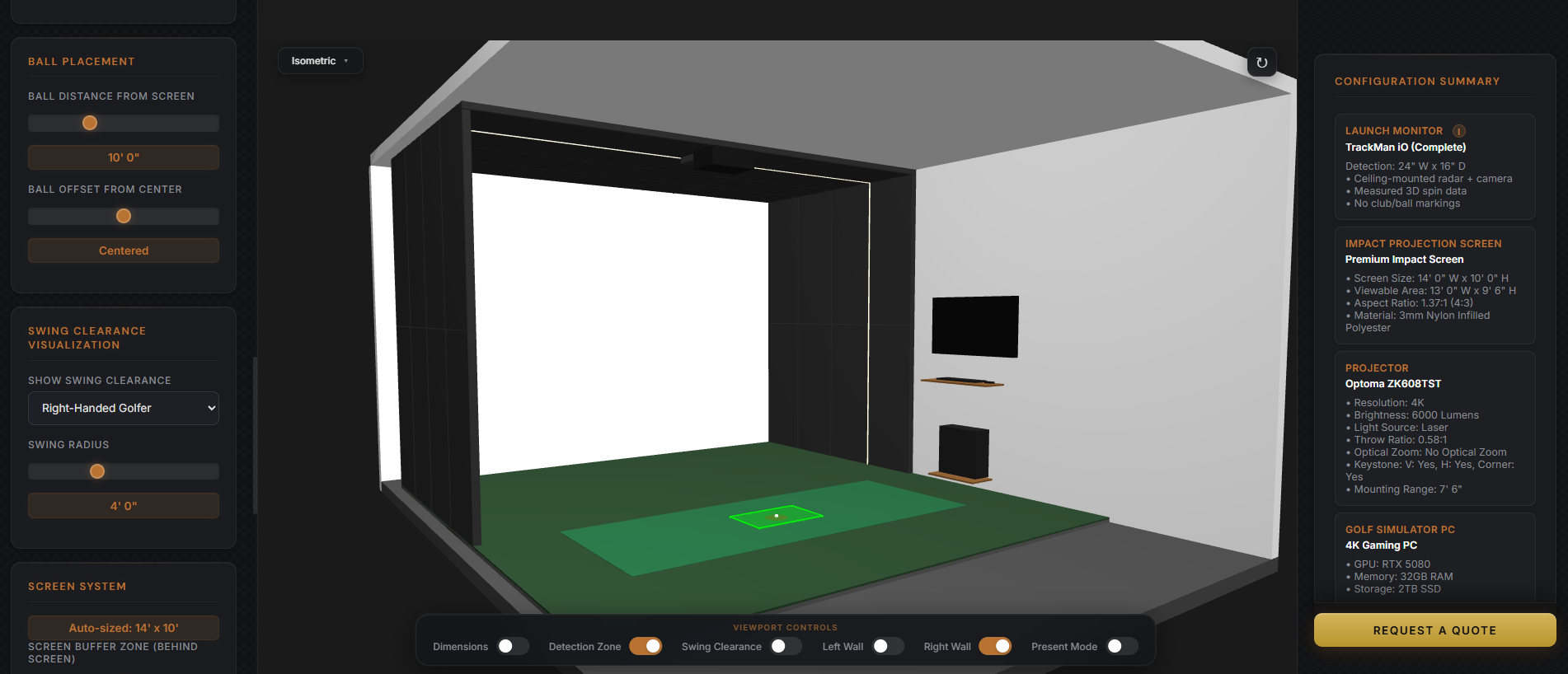
Our 3D builder visualizes vertical swing clearance in real time. Enter your room's exact ceiling height and see exactly how much room you have — before we ever show up on site.
Try the Builder ↗Ceiling obstructions
Your ceiling height on paper isn't always your ceiling height in practice. These are the most common things we find that eat into usable space or create problems for mounting and swing clearance:
Ceiling surface — what we can and can't mount to
The ceiling surface matters as much as the height. We need a structurally sound, flat surface to mount your launch monitor and padding to. Some materials work. Some don't.
Width
Rule of thumb: imagine an 8-foot diameter circle on the ground, centered on where the ball sits. That's your swing zone. Anything inside that circle — a wall, a corner, a support post — is a problem. The swing clearance visualization in our 3D builder is built on exactly this principle.
- Requires an offset hitting position — the ball sits to one side, not center
- Visually a bit unusual: you're standing in the middle of the bay but hitting off to the side
- Shanks have less room to travel — wall padding needs to be deeper (8–10 ft)
- Left + right-handed play requires a slider, a wide-zone monitor, or a second unit
- Launch monitor mounts center; both lefty and righty hit from the same position
- Full swing is comfortable for most players
- Wall padding can be 5–6 ft deep — enough protection without dominating the room
- Fits most residential builds with a dedicated room or converted garage bay
- No indoor swing syndrome — players aren't thinking about the walls
- Ideal for commercial use where a wide range of swings and comfort levels matter
- Wall padding can be shallower (5–6 ft), freeing up more of the room
- Allows wider screen and a more immersive visual field
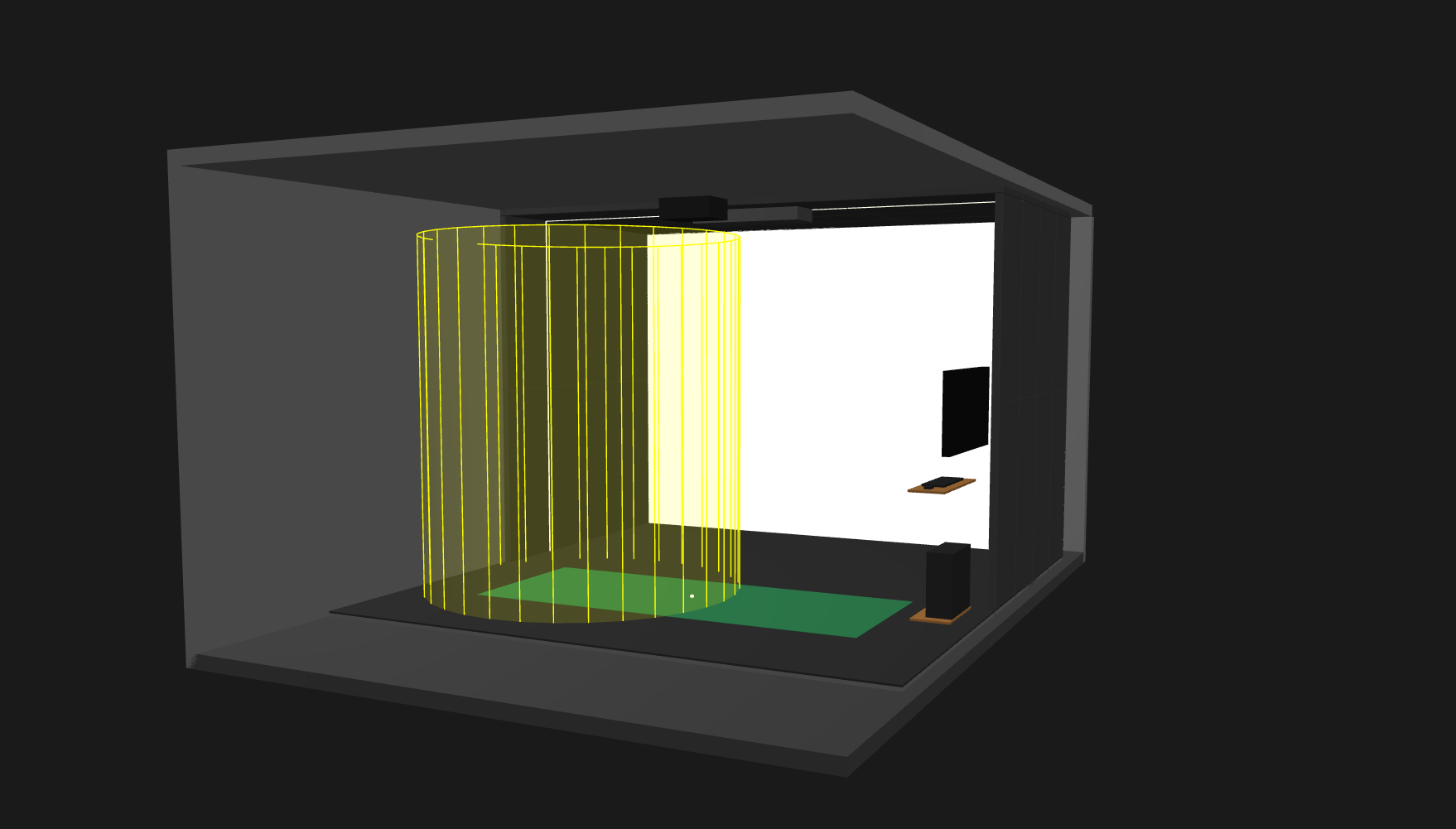
The yellow cylinder in our builder shows your swing clearance zone — an 8-foot diameter centered on the ball position. Walls, posts, or anything inside that zone gets flagged before we design anything.
Build Your Room ↗What offset hitting actually looks like
In a 12-foot-wide room, the ball can't sit at center — there isn't enough clearance on the backswing side. Instead, we offset the ball two to three feet toward one wall of the enclosure. You still stand roughly in the middle of the bay, but your visual sightline shifts. The projected image accounts for this, so it's playable — it's just not the same experience as hitting from center, and a bad shot that goes wide has less room before it hits something.
Narrow room solutions for lefty + righty
If you want both a left-handed and right-handed hitting position in a room under 14 feet wide, you have three good options:
- Slider system — a linear rail mounted in the ceiling that lets the launch monitor slide left or right to its preset stopping points. Solid option, but requires professional installation or serious DIY experience. Avoid buying a dedicated "golf sim slider" — they're priced at a significant premium. The same functionality is available sourcing the rail hardware directly.
- Wide-zone launch monitor — the Foresight Falcon has an unusually wide detection zone, letting both a lefty and righty hit without moving the unit. The Foresight GC Hawk also qualifies here.
- Trackman iO Duo — two separate units mounted in the ceiling, one positioned for a right-handed player, one for a left-handed player. The cleanest solution for a permanent dual-bay setup.
Width and wall padding depth
The narrower your room, the more depth of wall padding you need. When walls are close, a shank doesn't have much room to travel before it hits a finished surface. Wider rooms give it more time to slow down, so you can get away with shallower pads.
Depth
- We can make it work in some cases, but technology options become limited — ultra-short throw projector, camera-based monitor only
- Nobody is sitting behind the golfer
- The space is essentially one-purpose: hitting, nothing else
- Ball sits 8–10 ft from screen with room to spare
- At 18 ft wall-to-screen, you can fit a couple of chairs off to the side
- At 16 ft: one cup chair back there if you're careful about placement
- Always subtract 1 ft — screen takes up space behind its face
- Full seating area — a couch, multiple chairs, whatever you want back there
- Ball can sit 10+ ft from screen for a premium sight line
- Room for a bar setup, a putting area, or other features
- Wider projector options at the longer throw distances
The 8-foot rule — and why it matters more than you'd think
Eight feet from ball to screen is our recommended minimum. Here's something most people don't expect: placing the ball closer to the screen actually reduces ceiling strikes. If the ball is sitting 12 feet back from the screen, a wedge shot goes up steeply and is much more likely to hit the upper ceiling pads or the seam where the screen meets the pads. At 8 feet from the screen, that same wedge stays on the screen the majority of the time.
The old industry standard of 10 feet ball-to-screen is a carryover from early radar launch monitors, which needed to physically see a minimum of 10 feet of ball flight. Camera-based overhead monitors — which is what we install — don't have that constraint. Eight feet works fine technically; it's a comfort and sight-line preference, not a hard limitation.
Radar vs. camera — depth implications
If you're considering a floor-mounted radar unit (like an early-generation Mevo or R10), account for the fact that the device typically sits about 6 feet behind the ball. In a room with a 17-foot minimum, that pushes the monitor to 15 feet from the screen — with the power cord and setup requirement on the floor behind you. It creates a trip hazard, needs realignment every session, and limits your usable floor space.
Camera-based overhead monitors sit in the ceiling and don't exist on the floor at all. There's no setup, no cord on the ground, and no minimum clearance behind the ball. For tight rooms, they're the only practical choice.
When a Room Doesn't Qualify
Sometimes a space is simply not viable — and it's better to know that before spending money on design. Here's what typically takes a room off the table, and what options exist when it's borderline:
- Ceiling under 8 feet: No overhead monitor, no driver, no real game of golf. A putting simulator is possible. A full simulator is not.
- Width under 10 feet: Even an offset setup isn't practical. Short irons only, extreme risk to walls, not a build we can stand behind.
- Drop ceiling at 9 feet: The tile system can't support the load. If the structure above the tile is at 9 feet, removing the drop ceiling gets you there — but that's a renovation conversation, not just an install.
- Concrete ceiling with no attachment points: Requires a custom steel framework or wood blocking installation before we can mount anything. Still doable — just adds cost and timeline.
The borderline scenario is a room that's technically feasible but limited in a meaningful way — a 12-foot-wide room where the client wants left- and right-handed play, for example. We'll have that conversation before you sign anything. We'd rather talk through it honestly in discovery than have you realize it after the fact.
Not sure if your room qualifies? That's the exact question we start with on every discovery call. Bring your dimensions — width, height, depth, and any obstructions you know about — and we'll tell you straight. Start that conversation here.
Questions We Hear Often
My room is 9 feet — is it worth it?
Depends on who's using it and what for. A 5'8" player who primarily practices irons? Absolutely. A 6'3" player who wants to hit driver and host friends? It's going to be a frustrating experience. We'll be honest about what 9 feet does and doesn't get you for your specific situation.
Can I get a wider screen in a narrow room?
Screen width is primarily constrained by room width — you can't hang a screen wider than the room. But within that, we try to maximize the screen footprint to fill as much of the visual field as possible. The projector throw ratio and mounting position determine the rest.
What about a garage — does the door stay?
Usually yes, but we have to account for the door tracks, rollers, and motor in the ceiling plan. These can eat into usable height and interfere with the launch monitor mounting position. We've designed around it many times — it just needs to be in the measurements from day one.
Can I build a sim in a space under 17 feet deep?
In some cases, with the right technology stack. An ultra-short throw projector and a camera-based overhead monitor lets us get the ball as close to the screen as 8 feet, shrinking the minimum room depth. We'd look at the full picture before saying no — but we'd also tell you what you're giving up.